EKS Cluster Rollback: Quick Reference for Upgrade Recovery
Everything you need before rolling back an EKS cluster — the 7-day window, what moves and what doesn't, step-by-step CLI commands, node group handling, and the gotchas that will burn you.
EKS lets you roll back the Kubernetes control plane to the previous minor version after an in-place upgrade. The window is 7 days. After that, it’s gone — no exceptions, no AWS Support workaround.
This is a field reference, not a tutorial. Use it when something went wrong after an upgrade and you’re deciding whether to roll back.
What Gets Rolled Back vs. What Doesn’t
| Gets Rolled Back | NOT Rolled Back |
|---|---|
| Kubernetes API server version | etcd data (all cluster state preserved) |
| Control plane components + config | Customer workloads (pods keep running) |
| Platform version (latest for N-1) | EKS add-ons (manage separately) |
| EKS Auto Mode worker nodes | Managed Node Groups (your action required) |
| Self-managed and hybrid nodes | |
| Persistent volumes and data |
Workloads keep running through the rollback. Your pods don’t restart. The API server version changes underneath them.
Prerequisites — Check All Before You Start
- Cluster was upgraded in-place (not created at current version — those can’t roll back)
- Within 7 days of the upgrade completing
- Rolling back exactly one minor version (N → N-1 only — no skipping)
- Target version is currently a supported EKS version
- Cluster is in
ACTIVEstatus — no in-progress updates - If target version is in extended support → change upgrade policy to
EXTENDEDfirst - Cluster was not auto-upgraded at the end of extended support (if it was, rollback is impossible)
The 7-Day Hard Stop
The rollback window is exactly 7 days from when the upgrade completed — not from when you noticed the problem.
Set a calendar alert the moment any upgrade finishes. If you hit day 8, your options are:
- Fix forward by upgrading again once the issue is resolved
- Manual intervention at the application layer
There is no --force workaround for an expired window.
Rollback Decision Flow
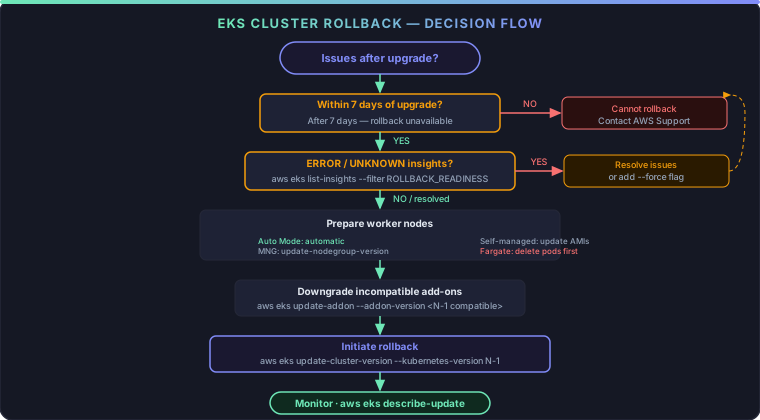
Step-by-Step with CLI Commands
Step 1 — Check rollback readiness insights
aws eks list-insights \
  --cluster-name my-cluster \
  --region us-east-1 \
  --filter '{"categories": ["ROLLBACK_READINESS"]}'
Get detail on a specific insight:
aws eks describe-insight \
  --cluster-name my-cluster \
  --region us-east-1 \
  --id <insight-id>
Manually refresh insight data after resolving an issue:
aws eks start-insights-refresh \
  --cluster-name my-cluster \
  --region us-east-1
Insight status guide:
| Status | Blocks Rollback? | Action |
|---|---|---|
| PASSING | No | Proceed |
| WARNING | No | Advisory — review but proceed |
| ERROR | Yes | Resolve, or use --force |
| UNKNOWN | Yes | Resolve, or use --force |
Step 2 — Prepare worker nodes
Nodes cannot run a version newer than the control plane after rollback.
| Node Type | What To Do |
|---|---|
| EKS Auto Mode | Nothing — EKS handles it automatically before touching the control plane |
| Managed Node Groups | Run update-nodegroup-version (below) |
| Self-managed / Hybrid | Update AMIs to target version manually |
| Fargate | Delete pods running current version, then proceed |
Managed Node Group rollback:
aws eks update-nodegroup-version \
  --cluster-name my-cluster \
  --nodegroup-name my-nodegroup \
  --kubernetes-version 1.30 \
  --region us-east-1
This respects your node group’s maxUnavailable / maxUnavailablePercentage settings.
Fargate note: rollback is not supported natively for Fargate nodes. Delete pods running the current kubelet version before initiating the control plane rollback. Those pods will re-launch with the rolled-back version when redeployed.
Step 3 — Downgrade incompatible add-ons
EKS does not roll back add-on versions automatically. Check compatibility before touching the control plane.
List current add-ons:
aws eks list-addons --cluster-name my-cluster --region us-east-1
Downgrade a specific add-on:
aws eks update-addon \
  --cluster-name my-cluster \
  --addon-name vpc-cni \
  --addon-version v1.12.0-eksbuild.2 \
  --region us-east-1
Rollback readiness insights check EKS-managed add-ons only. Self-managed add-ons are your responsibility to validate.
Step 4 — Initiate the rollback
aws eks update-cluster-version \
  --name my-cluster \
  --kubernetes-version 1.30 \
  --region us-east-1
Save the update.id from the response — you’ll need it to monitor progress.
To bypass ERROR or UNKNOWN insight checks:
aws eks update-cluster-version \
  --name my-cluster \
  --kubernetes-version 1.30 \
  --force \
  --region us-east-1
--force does NOT bypass:
- The 7-day window
- The “created at current version” check
- The sequential version check
- Auto Mode disruption controls (PDBs and do-not-disrupt annotations still honored)
Step 5 — Monitor
aws eks describe-update \
  --name my-cluster \
  --region us-east-1 \
  --update-id <your-update-id>
Status transitions:
| Cluster Type | Path |
|---|---|
| Standard | InProgress → Successful or InProgress → Failed |
| Auto Mode | Stays ACTIVE during node rollback → UPDATING for control plane |
When you see Successful, the rollback is complete. Verify your add-ons are healthy and your workloads are behaving as expected.
Gotchas
Changes during rollback aren’t captured. Insights are point-in-time. If you create resources using new-version APIs after the insight check runs but before rollback completes, those resources persist in etcd. They may be incompatible with the rolled-back API server and won’t be garbage collected automatically.
Extended support charges restart immediately. If you roll back from a standard-support version to an extended-support version, extended support billing resumes the moment rollback completes. Budget accordingly.
CloudFormation doesn’t trigger rollback. If a CFN stack update fails and reverts to a template with a lower Kubernetes version, that does not trigger a cluster version rollback. You must call UpdateClusterVersion explicitly — CFN template changes alone do nothing.
Sequential rollback only. You can only go N → N-1. If you upgraded 1.31 → 1.32 → 1.33, you can roll back to 1.32. Getting to 1.31 requires a second rollback within its own 7-day window.
Incompatible resources stay in etcd. If you used --force to bypass insight checks, any resources created with newer APIs remain persisted. The API server on N-1 won’t recognize them — they’re inert until you clean them up manually.
Quick Reference Card
ROLLBACK ELIGIBILITY
  ✓ In-place upgraded cluster   ✓ Within 7 days
  ✓ N → N-1 only               ✓ Cluster ACTIVE

ORDER OF OPERATIONS
  1. Check insights (ROLLBACK_READINESS)
  2. Prepare worker nodes (MNG: update-nodegroup-version)
  3. Downgrade incompatible add-ons
  4. aws eks update-cluster-version --kubernetes-version N-1
  5. Monitor: aws eks describe-update

AUTO MODE: nodes handled automatically — no step 2 needed

FORCE FLAG: bypasses insight checks only
           does not bypass: 7-day window, version checks,
           Auto Mode disruption controls
- AWS EKS Docs: Update cluster version — upgrade playbook before you need this page
- Cluster upgrade best practices — pre-upgrade checklist from AWS
- Better Stack — monitor your cluster health endpoints so upgrade regressions surface before users report them (affiliate link)
Comments